MVB Field Guide › Process
Part 3: Process. How We Work
Structure determined who sits where; Process determines how work flows between them. This is the longest part of the handbook because it is the part people and agents execute against every day.
Why Process Consistency Matters
Every piece of work must flow through Shortcut with accurate, current, and normalised data, because Shortcut is how the entire organisation sees our reality. Think of it like an air traffic controller’s radar system. When the data is right, teams get help early, leaders make good decisions, and forecasts you can trust replace guesswork. When it’s wrong, everyone is flying blind.
If you radiate information well, nobody needs to chase you for status. That is the goal of every process in this part.
This part is the operating system that humans and agents execute against.
If something here isn’t earning its keep, challenge it at your retrospective or message the handbook steward directly. Until then, please follow the process until your proposed change is made and rolled out across the system. Consistency across dozens of teams is what makes the data readable. Standardising a complex system trades away some local flexibility. We make that trade-off deliberately because the alternative (every team doing things differently) makes the whole system too opaque.
Two Delivery Lanes
All work generally follows the same delivery process. What differs across the two lanes is priority, governance, and scope commitment.
Enterprise Epics and BAU use the same teams, the same Shortcut workflow, the same Definition of Ready and Done, and the same Iteration Planning and Review events. The two lanes are priority tiersThis concept is analogous to Kanban’s classes of service, where different work types receive different treatment based on their cost of delay profile. See D. J. Anderson, Kanban: Successful Evolutionary Change for Your Technology Business (2010). within one delivery model, not two separate models.
1 This concept is analogous to Kanban’s classes of service, where different work types receive different treatment based on their cost of delay profile. See D. J. Anderson, Kanban: Successful Evolutionary Change for Your Technology Business (2010).
Lane | What It Is | Duration | Led By |
|---|---|---|---|
Enterprise Epics | Largest strategic initiatives: market launches, product changes, technology migrations. Formal governance with executive oversight. | Fixed scope/duration, with any external commitments based on detailed planning and forecast date ranges with a stated confidence | Epic Manager + executive sponsor |
BAU & Hygiene | Maintenance, bug fixes, operational improvements, platform maturity. Demand is actively throttled to protect strategic capacity. Business stakeholders own prioritisation, not the engineering department. | Ongoing | Business stakeholders |
Enterprise Epics
Enterprise Epics are our largest strategic initiatives: major market launches, product changes, technology migrations.
These are relatively few and operate with more coordination and governance. Each begins with an Epic Planning Event and ends with an Epic Retrospective: a final working review session (like an Iteration Review but for the whole Epic) followed by a lessons-learned retrospective. Tracked via Epics in Shortcut.
Formal Epic governance is a muscle most product organisations under-develop. The mechanisms that make this lane work (Epic Planning Event quality, milestone tracking, executive oversight cadence, Epic Retrospective rigour) deserve deliberate investment, and the honest way to adopt this section is to treat it as a standard to grow into, inspected at every Epic Retrospective, rather than a capability you can declare.
Business as Usual & Hygiene Change Requests
BAU demand is actively throttled to protect strategic capacity. Business stakeholders own prioritisation, not the engineering department. When two or more stakeholders compete for a shared dependency or bottleneck service (e.g., Platform Engineering), the conflict escalates to the CMO and CTO. A recurring conflict of this kind is a structural signal that we need to either eliminate the dependency or make the constraint more visible.
BAU covers operational work: maintenance, incidents and bug fixes, operational improvements, and platform maturity. Tracked via Stories on Value Stream Backlogs, using labels as necessary.
Priority Hierarchy
The overall prioritisation hierarchy across the two lanes is: P0 Incidents > Enterprise Epics > BAU & Hygiene Change Requests. Expedite is an overlay, not a fourth tier: a 🚨 Expedited Story (only the CTO or CMO may apply it) is pulled as the next piece of work ahead of other Enterprise Epic and BAU work, but it never outranks a P0 Incident. If the CTO or CMO judges it urgent enough, they may also interrupt work in process, which is otherwise reserved for P0s.
The global Backlog rank is visualised in the Delivery Intelligence report, which acts as our single source of truth for relative prioritisation. It also provides statistics-based delivery forecasts, flow diagnostics, Epic and Label completion tracking, and organisational health metrics across the full Department → Value Stream → Capability → Team hierarchy.
Demand Governance
Three mechanisms control how much work enters the system:
- Lane priority (Enterprise Epics > BAU & Hygiene): BAU demand is throttled to protect strategic capacity, and business stakeholders own its prioritisation.
- WIP limits control what teams pull. If overloaded (>1.3 stories per Builder or >0.75 Iterations of WIP), freeze new intake. See “WIP Limits” below.
- The displacement rule ensures Unplanned work doesn’t silently expand scope. If it pushes past Raw Velocity, something Planned comes out. See “The Displacement Rule” below.
When priorities conflict across lanes or between stakeholders competing for the same team, escalate to your VSO, the VP of Delivery, the CMO, or the CTO. That’s a structural decision, not a team-level one.
What We Ask of Business Stakeholders, and What You Get
The asks: own the prioritisation of your BAU demand, including a top-10 bug list capped at ten live items; accept the lane priority when Enterprise Epics and BAU collide; route conflicts over shared teams to the CMO and CTO rather than negotiating side-deals with teams; and hold your requests to the Definition of Ready so teams start with what they need.
The returns are measurable. You get a single transparent queue in place of a status-chasing exercise: statistics-based delivery forecasts updated every fortnight, a Planned % that shows how much of engineering’s capacity went where it was committed, and queue metrics that show trouble coming before dates slip. One structural note deserves naming: when a defect pattern keeps consuming your top-10 slots, the durable fix is usually systemic rather than another one-off repair, and the monthly constraint review exists to make exactly that call.
Events
The events below apply to both delivery lanes. Enterprise Epics add Epic Planning Events and Epic Retrospectives; otherwise they use the same events as BAU.
Overall Cadence
We operate on a fortnightly cadence, which we call Iterations. Broadly speaking, we:
- Prepare work for the next Iteration or two (Initial and Joint Backlog Refinement)
- Select a subset of that work to attempt to complete as a team-of-teams during the Iteration (Value Stream Iteration Planning)
- Plan in greater detail how we will complete the work (Team Iteration Planning)
- Complete the work independently, with other teams in the department, and/or in collaboration with teams outside it (Daily Huddles and just talking to one another)
- Review the work collaboratively with stakeholders (and ideally end-customer representatives) and collectively decide on material changes to the next Iteration’s likely planned work (Value Stream Review)
We avoid starting Iterations, ending Iterations, or releasing to production on Mondays or Fridays because people are more likely to take these days off.
We also regularly inspect and adapt how we function at each of the Team/Capability, Value Stream, and Department levels.
Cross-Lane Cadence Summary
- Weekly: Business stakeholder top-10 bug list review + WIP assessment (see the Delivery Intelligence report and Quality Report)
- Fortnightly: Aligns with Iteration Planning. New Enterprise Epics kick off as slots open.
- Monthly: Constraint review + budget rebalancing across lanes. Key question: “Is the current constraint still where we think it is, or has it shifted?”
- Quarterly: Org design review.
Schedule
The schedule below applies to both delivery lanes, shown for an organisation with three Value Streams (A, B, C). Epic Planning Events and Epic Retrospectives are scheduled as needed. The VP of Delivery owns the Iteration Review and Iteration Planning schedule.
Day | Weekday | Event | Attendees | Duration |
|---|---|---|---|---|
1 | Monday | VS Iteration Review: A / B / C (staggered) | VSO, 1–2 Builders/team, PMs, stakeholders | 1h each |
2 | Tuesday | VS Iteration Planning: A / B / C (staggered) | VSO, 1–2 Builders/team, PMs, executive sponsors | 1h each |
2–3 | Tue–Wed | (Multi-) Team Iteration Planning | All Builders, PM(s), VSO (available) | 1–2h per team |
3 | Wednesday | Release to production | Release engineering, one Builder/team | As needed |
3 | Wednesday | (optional) “Sand” workFrom the rocks-pebbles-sand jar metaphor: sand is the small, low-coordination work that fills the gaps around planned Stories—tiny improvements, cleanup, quick wins. 2 From the rocks-pebbles-sand jar metaphor: sand is the small, low-coordination work that fills the gaps around planned Stories—tiny improvements, cleanup, quick wins. | Individual teams | – |
4–5 | Thu–Fri | Work | – | – |
6 | Monday | Regression to stage | Release engineering, one Builder/team | As needed |
7 | Wednesday | Joint Backlog Refinement: A / B / C (staggered) | VSO, PMs, selected team reps, VP of Delivery | 1h each |
8 | Wednesday | Release to production | Release engineering, one Builder/team | As needed |
9 | Thursday | Department Retrospective (every 4 weeks) | CTO, CMO, VP of Engineering, VP of Delivery, VSOs, Enterprise Performance Coach, incident-management owner, team reps | 90m |
10 | Friday | Work | – | – |
– | Per team | Team Retrospective | All Builders, PM(s) | 1h |
Epic Planning Events and Epic Retrospectives (Enterprise Epics)
Enterprise Epics begin with an Epic Planning Event and end with an Epic Retrospective. BAU work uses Team Retrospectives for the same purpose.
An Epic Planning Event is typically 1–2 days of synchronous collaboration to establish:
- Scope and success criteria, formalised in the Epic’s description.
- Team composition and the Epic Manager accountable for delivery.
- An estimated backlog with MoSCoW prioritisation, forecasted to the Epic’s end date. Align on scope, capacity, and delivery sequence up front so teams aren’t discovering requirements mid-flight.
- Risks identified and classified using ROAM:
- Resolved: dealt with, no longer a risk
- Owned: assigned to someone specific to manage
- Accepted: acknowledged, impact understood, no action needed
- Mitigated: action taken to reduce likelihood or impact
ROAMed risks are revisited at each VS Iteration Review and at regular Enterprise Epic reviews.
For Enterprise Epics with fixed external dates (a brand or market launch, say), scope emerges progressively as external parties (partners, legal, regulatory) finalise their inputs. The Kick-Off must identify what is known, what is unknown, and what dependencies exist outside the department (third parties, staging, training). ROAM these aggressively. The biggest risk is cross-department and cross-company dependencies that surface at integration instead of planning.
An Epic Retrospective has two parts: a review of results with stakeholders (what was delivered, what was learned, what comes next) followed by a retrospective with the team (how we worked together, what to improve). Come prepared to share what worked, what didn’t, and what you’d do differently. The key question: “What assumption about how we work did this Epic confirm or challenge?” Epic Retrospective outputs should include a presentation to engineering so learnings flow back to BAU teams.
Department Events
Department Retrospective
All departments bound to this handbook hold Department Retrospectives. Unlike individual Team Retrospectives that focus on team-specific learning, this session looks mostly at cross-team structural and cultural issues that impede our effectiveness. For more details, see LeSS’s Overall Retrospective article.
This event is designed and facilitated by our Enterprise Performance Coach and attended by the CTO, Value Stream Owners, Engineering Coaches, and team representatives. The focus isn’t on rehashing what teams already know but on uncovering broader inefficiencies and opportunities for improvement. This is where experiments are proposed to address our broadest systemic challenges:
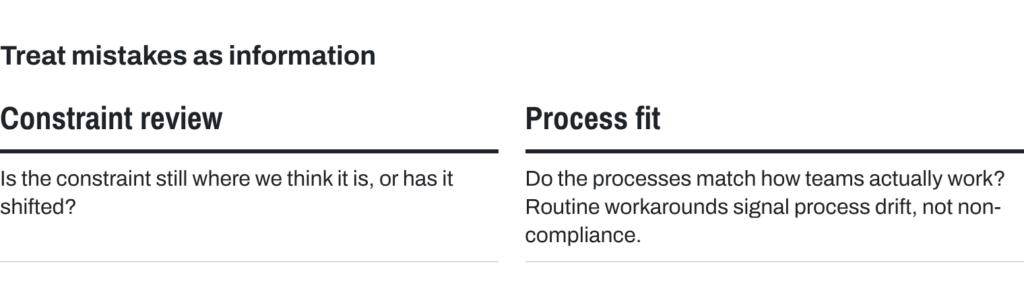
- Constraint review: Is the constraint still where we think it is, or has it shifted? Policies built around the old constraint become the new constraint if not revisited.
- Process fit: Do the processes in this handbook match how teams actually work? Routine workarounds signal process drift, not non-compliance.
We reach out to teams and leaders outside the department when necessary to solve even more systemic problems.
Worth repeating: this handbook is in perpetual beta, potentially improving after every Department Retrospective. That’s how we standardise and “lock in” our learnings.
We treat the handbook like a living system, always subject to inspection and experimentation. As Larman & Vodde note, “Large-scale agile adoptions must emphasise a series of small, relentless experiments rather than big-bang transformations, creating deeper organisational learning in short cycles.”Larman, C., & Vodde, B. (2008). Scaling lean & agile development: Thinking and organisational tools for large-scale Scrum (p. 52). Addison-Wesley.
3 Larman, C., & Vodde, B. (2008). Scaling lean & agile development: Thinking and organisational tools for large-scale Scrum (p. 52). Addison-Wesley.
Value Stream Events
Joint Backlog Refinement
Joint Backlog Refinement brings representatives from all teams within the Value Stream together to tend to the overall health of the backlog and collectively refine and break down larger requirements into smaller, actionable pieces. By focusing on priorities for the next Iteration and the two following at a higher level, teams create clarity without over-planning.
Hosted by the VP of Delivery with PM support, fortnightly on the off-planning week. This synchronous collaboration ensures that everyone shares a clear understanding of the work, while surfacing and addressing cross-team dependencies early. Joint Backlog Refinement serves a similar function to the initial scope discussion in Enterprise Epic Kick-Offs: building shared understanding of requirements before committing to delivery. For new Teams or Epics, an Initial Product Backlog Refinement session may be needed before the first Joint Backlog Refinement cycle begins.
Value Stream Iteration Planning
Value Stream Iteration Planning aligns the teams on near-term priorities. The Value Stream Owner opens with a clear statement of why this Iteration is valuable and presents prioritised Stories, both of which can be collaboratively refined with the Builders. Teams then tentatively agree on the work they will take, based on their capacity, skills, and dependencies.
Everyone treats this as a joint planning conversation. Capacity loading is necessary, but the reason you’re in the same room is to find out now whether your stories could block each other, so you can enter Multi-Team Planning prepared. What good looks like:
- The VSO opens with what success looks like this Iteration. Not “let’s go team by team” but a clear statement of the outcome that matters most for the next two weeks and why.
- Check velocity, then map capacity. Ground the conversation in each team’s Plannable Velocity before apportioning work.
- Identify opportunities to work together. If two teams are touching related areas, plan multi-team collaboration now (shared design sessions, cross-team pairing, coordinated testing).
- Surface cross-team dependencies. If your Story depends on another team’s output, say so now, not mid-Iteration.
- Clarify final questions. Resolve remaining questions before teams leave for detailed Team Iteration Planning.
Stay for the whole session. If you leave after your team is discussed, you lose the shared picture of what the Value Stream is trying to accomplish together. Before closing, the facilitator asks: “What are we not seeing? What assumption could hurt us this Iteration?”
As teams develop broader skills and backlogs consolidate, teams will increasingly select work collaboratively rather than only from their own queue. The direction is fewer backlogs, not more: ideally one organisational backlog with Value Stream views, not dozens of team queues. We’re not there yet, but VS Planning should already be a collaborative discussion about Value Stream priorities. This event is modelled on LeSS’s Sprint Planning One:
Value Stream Iteration Planning is a relatively simple and often short meeting. Some tips for getting it to work well:
- Product Owner presents the highest priority items from the Product Backlog to the team.
- The teams apportion the items amongst themselves.
- Discuss the need for learning between teams during the upcoming sprint and plan for a Multi-Team Iteration Planning if needed.
- Any open questions related to the items (that weren’t resolved in earlier Product Backlog Refinement) are discussed. The most common technique used for Value Stream Iteration Planning is called ‘put the cards on the table.’ The top of the backlog is [displayed in Shortcut] and the teams … discuss which teams can best do which items.”LeSS Company B.V. (n.d.). Sprint Planning One. LeSS. less.works/less/framework/sprint-planning-one
4 LeSS Company B.V. (n.d.). Sprint Planning One. LeSS. less.works/less/framework/sprint-planning-one
We emphasise small-batch planning and WIP limits to accelerate learning and reduce coordination overhead.
Teams break items into small increments and limit how many they juggle. This avoids large queues of unfinished work, shortens feedback loops, reveals issues early, and lets us pivot faster when data shows a new priority or risk.
If the backlog swells or teams find themselves stuck in long “in progress” lists, it’s time to slice stories smaller or pause new starts until current items reach done.
Value Stream Review
Representatives from each team get together every fortnight on a predictable schedule to inspect the latest increments and adapt. We strive to keep the feedback loop immediate; if we postpone feedback, we risk letting small misalignments snowball into major delays.
“We need fast feedback to catch errors early, gain new insights, and adapt our course. A delayed or missing feedback loop turns small variances into major risks.” Donald G. Reinertsen
This is why we hold a synchronous Value Stream Review every two weeks. Fresh feedback now is infinitely cheaper and safer than discovering an issue months later.
These are the sorts of conversations we might have:
- From the business to the teams: share any relevant unprompted customer feedback or market insights that might impact multiple teams or Epics. Keep it brief; most insights will be in response to the Product Increment demonstrated by the teams.
- For selected work items in the Product Increment, conduct a synchronous inspect/adapt session, rather than simply inspecting and accepting, to review the increment. Discuss newly identified impediments or risks, revisit past issues using techniques like ROAM, and, if applicable, examine the Epic’s forecast chart to update any forecasted release dates.
- By team: discuss significant highlights, impediments, and personnel changes.
- Medium-term horizon: an inspect-and-adapt discussion about the next several weeks of work to focus the coming Iteration’s Backlog Refinement activities. See LeSS’s Sprint Review article for more details.
The VS Review is where stakeholders tell you whether what you shipped solves their problem. Listen for surprises. This feeds back into how you write stories: if you’re writing technical tasks without a clear customer-centric what and why, you won’t get useful feedback, let alone have anything to celebrate.
Value Stream Retrospective
Conducted at the Value Stream level with Value Stream leadership and representatives from each team present. Cadence: every four weeks, on the off-week from the Department Retrospective; owned by the Value Stream Owner; 60 minutes. The purpose is to find systemic improvement opportunities that cross team boundaries but sit below the Department level. Output: each Value Stream Retrospective produces at least one 📈 Retro Action Story; systemic findings that exceed the Value Stream’s authority escalate to the Department Retrospective and, where they need executive action, to the CTO or CMO. This is the middle link in the team → Value Stream → Department learning chain: a finding a team cannot resolve rises here, and one this level cannot resolve rises again, so no systemic issue dies for lack of an owner.
Team Events
We prescribe a minimal, mandatory framework and expect teams to engage with coaching support to develop effective practices. Most of the factors that limit the adaptiveness of our organisation exist between teams, not within them, but that doesn’t mean within-team effectiveness takes care of itself.
Agile’s first wave focused heavily on the performance of individual cross-functional teams but was ignorant of the importance of cross-team interactions. We believe cross-team interactions are more important. While we see tremendous value in first-generation Agile frameworks, especially in their capacity for expanding a team’s scope of skills, we find them insufficient on their own.
Therefore, teams are not required to “use Scrum” or hold any framework-prescribed event. You do not need to “do Agile.” In fact, we do not want any team blindly following any framework: we expect thoughtful consideration and engagement with coaching support.
Your team is required to be empirical: regularly inspect and adapt how you work within and beyond your team, then seek to continuously improve. Put another way, “Our work is to do our work and to improve our work,” and we “continuously improve for its own sake.”LeSS Company B.V. (n.d.). Continuous improvement towards perfection. LeSS. less.works/less/principles/continuous-improvement-towards-perfection
5 LeSS Company B.V. (n.d.). Continuous improvement towards perfection. LeSS. less.works/less/principles/continuous-improvement-towards-perfection
Where a Value Stream contains Capabilities (groups of related teams), the team-level events below may also run at the Capability level, bringing multiple teams together for shared planning, retrospectives, or huddles.
Mandatory: (Multi-) Team Iteration Planning
One or more teams in the Value Stream take the stories they selected at Value Stream Iteration Planning and plan how they will accomplish the work. Practically speaking, they add Checklist Items to at least the first or riskiest of the Stories they’ll work on. This can be done as a single team or as multiple teams, and happens as soon as possible after VS Iteration Planning.
VS Planning tells you which stories your team is taking on and whether any interact with other teams’ work. Team Planning is where you figure out how:
- Add Checklist Items to at least the first few Stories (or the riskiest ones) you’ll work on.
- If your stories have cross-team interactions discovered at VS Planning, meet with those teams now. How will you accomplish the work together? Better to identify integration issues on day 1 than day 7.
- Not all details get hashed out at VS Planning. That’s where interactions are discovered. They get resolved at Team Planning.
This event is modelled on LeSS’s Sprint Planning Two:
“It is common for two teams to work on similar related features or work on different features that affect the same components. In that case, it can be useful to have a Multi-team [Team Iteration Planning] meeting. This is done by having the teams meet [at the same time] with each team conducting its own [Team Iteration Planning]. That way the teams can:
- have a shared design session,
- ask questions of one another at any time,
- coordinate shared work,
- find other opportunities to work together and learn from each other (e.g. cross-team pair programming).”LeSS Company B.V. (n.d.). Sprint Planning Two. LeSS. less.works/less/framework/sprint-planning-two
6 LeSS Company B.V. (n.d.). Sprint Planning Two. LeSS. less.works/less/framework/sprint-planning-two
Mandatory: Fortnightly Team Retrospectives
Every team must hold a fortnightly retrospective. Par is a well-facilitated 45–60 minute session. Retros cannot be cancelled, only shortened. If a full retro can’t happen, find at least something to test: even “what is one experiment we’ll try next Iteration?” in the last huddle counts. Find the next adjacent possible, but don’t give up on holding a quality retrospective.
Small, consistent improvements compound: a ~2.5% gain in effectiveness every fortnight doubles a team’s effectiveness in a year.
Work should almost never carry from Iteration to Iteration. If stories are regularly carrying over, that’s a retro topic, not a normal state.
Good retro topics: Unplanned stories, recurring interruptions, repetitive manual tasks that could be automated, and deferred items from previous Iterations. Re-acknowledge deferred items each Iteration: if something keeps getting pushed, name it. If the same kind of problem keeps appearing, that’s a system issue worth discussing.
Every retrospective, at team, Value Stream, and Department level, must produce at least one action item captured as a 📈 Retro Action Story in Shortcut (the Quality Report tracks this per team; the Value Stream and Department retrospectives own their own actions the same way). No team is so good it cannot improve something. At minimum, there is always something to learn from one another about working with AI. Teams with no retro actions added or completed in the last 2 weeks are surfaced in the Quality Report. Look for improvements to the five design levers (Strategy, Structure, Processes, Rewards, People) that you can propose to leaders.
Resist the temptation to leave with a long list. Derby and Larsen’s finding from two decades of retrospective practice is blunt: limit yourself to one or two experiments per retro, because teams that leave with five complete zero.Derby, Larsen & Horowitz, Agile Retrospectives, 2nd ed., 2024 Their ownership test is equally useful: if nobody volunteers to shepherd an experiment, the team lacks real energy for it, and the honest move is to pick something the team does have energy for. Where confidence in a fix is low, shape it as a small, reversible, safe-to-fail probe rather than a permanent policy change, and agree up front what would tell you to amplify it or pull it back.Snowden et al., Cynefin, 2022
7 Derby, Larsen & Horowitz, Agile Retrospectives, 2nd ed., 2024
8 Snowden et al., Cynefin, 2022
Include what went well: “What went unusually smoothly, and what conditions made that possible?” Understanding success is as valuable as diagnosing problems. Conditions that enable good outcomes are often invisible and fragile; naming them is how you protect them.
Team leads can and should attend and participate as peers. Ideally, choose a non-lead to facilitate.
A “blame culture” seriously compromises a team’s performance, and retrospectives are where blame culture is either dismantled or reinforced.
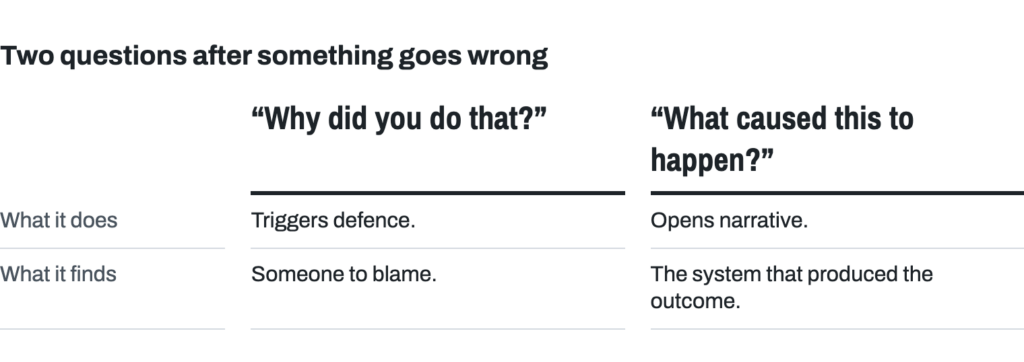
Retrospectives require psychological safety. Most incidents result from reasonable people making rational decisions with incomplete information under pressure, not from carelessness or incompetence. Our goal is to understand the system that produced the outcome, not to find someone to blame. Ask “what caused this to happen?” not “why did you do that?” The first opens narrative; the second triggers defence. This is Sidney Dekker’s local-rationality principle: people’s actions make sense to them given their goals, attention, and knowledge at the time, so the useful question is what made the action make sense.Dekker, The Field Guide to Understanding ‘Human Error’, 3rd ed., 2014
9 Dekker, The Field Guide to Understanding ‘Human Error’, 3rd ed., 2014
Blame comes from stories, not facts. When you notice blame in a retrospective, separate the two (an example Derby and Larsen use to teach exactly this move):
- Fact: “The build broke ten times yesterday.”
- Story: “None of us cared enough to fix it.”
The fact is indisputable. The story is interpretation, and often wrong. When you hear a story, ask: “What facts are we working from? What made that decision seem right at the time? What other explanations fit these facts?”
To help you do this, hold Norm Kerth’s Retrospective Prime Directive in mind: “Regardless of what we discover, we understand and truly believe that everyone did the best job they could, given what they knew at the time, their skills and abilities, the resources available, and the situation at hand.”
One more discipline from Dekker: when your retro produces a corrective action, check it against his list of four false quick fixes: reprimand somebody, retrain somebody, write another procedure, add more technology. Each suppresses a symptom without changing the condition that produced it. If your proposed experiment is one of the four, ask what a harder fix would look like, one that changes the condition rather than asking the same people to try harder against it.
For retrospective facilitation guidance, activity suggestions, and templates, contact the Enterprise Performance Coach, see retromat.org, or read Derby, Larsen & Horowitz’s Agile Retrospectives.
Expected: Daily Huddles
Your team must hold a daily huddle (or demonstrate an alternative practice that achieves the same objectives: surfacing blockers, coordinating handoffs, and maintaining flow). Most teams find a focused, regularly scheduled 15-minute huddle beneficial, in person or via video with all cameras on.
Walk the board: start with Stories closest to Accepted, not with people reporting status. Skip the “what did I do yesterday / what will I do today / blocked” format. Focus on the work, not people’s busyness.
As Donald Reinertsen notes, “In product development, our problem is not idle engineers but idle work products.” It’s less about whether each person is 100% utilised and more about moving stories to done efficiently. Goldratt makes the same cut with different words: activating a resource and utilising it are not synonymous (The Goal). Busy is not the goal; flow is.
Focus on:
- What’s closest to Accepted? What does it need to get there?
- What’s blocked? Pair up or escalate. Don’t start new work while something is blocked. “I need help with X” is a contribution, not a confession.
- Any new risks? Anything that needs help from outside the team?
- Anything feel off? If something seems fragile or risky, name it now. Don’t wait for it to break.
- Quality Report: spend 2 minutes reviewing your team’s flags and fixing Critical issues on the spot.
The whole team is accountable for every Story in the Iteration. If you see someone struggling, help them before picking up new work.
When picking up or switching work, state your intent. “I intend to start SC-12345 because it unblocks the UAT queue.” This replaces permission-seeking and makes your reasoning visible.
If you’re unsure about a technical approach, say so. “I’m leaning toward X because Y, but I’m not sure about Z” is more useful than silence. Uncertainty shared early is cheap; uncertainty discovered late is expensive.
Travelers: A Builder may join another team for an entire Iteration to help with a specific need. Entire Iteration, not a few days, to avoid Builders split across multiple teams. The traveler works on the host team’s board. Both teams’ velocity is distorted for that Iteration, and that is the point: the distortion makes the cost of travel visible and creates healthy friction against casual borrowing of people.
Teams that resist holding a daily huddle often do so for a few reasons:
- The huddle consistently takes longer than 15 minutes. Reviewing goals, WIP, and next stories should take no longer. Prolonged discussions suggest too much WIP or lack of focus. Anyone in the team can suggest parking lengthy topics for follow-up, allowing non-essential team members to leave after the review. For remote teams, we suggest scheduling 30 minutes to allow subsequent parking-lot discussions, though the review itself should still be 15 minutes or less.
- The meeting time and/or place is not consistent, creating scheduling challenges and interruptions to flow. It helps enormously to hold the huddle at the same time in the same place every day; people can then plan their day so they don’t start a major heads-down effort right before the meeting.
- The huddle is held as a status update for stakeholders, not a useful discussion by and for Builders. The huddle is designed by and for the Builders. All stakeholders are welcome to observe, and to participate if invited, but they are not the intended primary beneficiaries.
A daily huddle that people dread is worse than no huddle. Signs of low psychological safety in huddles:
- Silence when asked for blockers or concerns
- Only senior members speaking
- People saying “nothing to add” when they have concerns
- Defensive language or hedging (“just kidding,” “maybe this is stupid but…”)
If these patterns emerge, the team should discuss what would make the huddle feel safer. Consider asking: “What would make it easier to raise concerns here?”
Backlogs
A Critical Shortcut Note
Shortcut allows users without administrator privileges to configure some global settings. This means a typical user can inadvertently change settings with significant and negative global ramifications. Do not change any of the following settings without talking to the Shortcut administrator (our Enterprise Performance Coach) first: Iterations, Teams, Custom Fields, and Epic Automations. Any changes to these settings will be reverted without warning. See “Shortcut: Do Not Touch” and the administration notes at the end of this part.
Department, Value Stream, and Team Backlogs
Every Backlog has a single accountable owner: one person who owns the priority decisions for that Backlog. Not a committee, not “shared ownership,” not “the team decides.” One person, accountable for the rank order, who can explain why item #7 is above item #8.
Backlog | Owner |
|---|---|
Department | CTO / CMO (jointly) |
Value Stream | Value Stream Owner |
Capability | Value Stream Owner (or delegated) |
Team | PM owns the rank; the team pulls freely from the top |
Business stakeholders own prioritisation within BAU; conflicts over demand or scarce shared teams escalate to the CMO and CTO.
Our primary planning artefacts are Stories of varying sizes (aka Backlog Items) on the Department, Value Stream, Capability, and Team Backlogs. In rare cases we use Shortcut’s Epics.
“Test of a good Product Backlog? Your customers immediately understand every item.”Larman, C., & Vodde, B. (2010). Practices for scaling lean & agile development: Large, multisite, and offshore product development with large-scale Scrum (p. 236). Pearson Education.
10 Larman, C., & Vodde, B. (2010). Practices for scaling lean & agile development: Large, multisite, and offshore product development with large-scale Scrum (p. 236). Pearson Education.
There is an ideal blend of Stories across the lanes:
- 50% strategic new product development (Enterprise Epics)
- 20% small improvements and “keep the lights on” requests (BAU)
- 10% pre-planning large fixed date/scope Epics (Enterprise Epics)
- 10% longer-term discovery work (embedded in teams)
- 10% continuous improvement (Team Retrospective actions, process improvements)
- ~0% defects (when defects consume slots, it drives root-cause fixes)
Some readers may correctly notice that longer-term discovery work is incorporated into the same system that delivers value in the short term. We do not have a separate “discovery” system distinct from our “delivery” system (such as those proposed in the “dual-track Agile” concept). Instead, we have a “driving” system that handles both discovery and delivery. Builders are intimately involved in longer-term discovery work right from the beginning.
The Backlogs must not get too large; they need continuous maintenance and pruning. If you think of Backlogs as a queue, it’s a lot easier to appreciate the cost of having excessively large Backlogs.
A rule of thumb: assume eight teams, four stories per team per Iteration, planning up to three Iterations ahead = 96 Stories in the short term. Add about 50 Huge Stories for the long term, and you arrive at these limits (recalculate for your structure, and revisit quarterly):
- Ideal: ≤150 Stories across ALL backlogs (Department, Value Stream, Capability, and Team)
- Caution: >150–≤250
- Warning: >250
Strategies to keep Backlogs at manageable length:
- Refuse new additions that are unlikely to be worked on any time soon
- Un-split more-granular stories into less-granular ones (e.g., 10 Stories for 1 report each can be merged back into 1 Huge Story with Sub-tasks)
- Consider a new approach (e.g., rather than 10 Stories to build 10 reports, have 1 Story to implement a self-service BI tool)
- Delete work that is not likely to be done anytime soon (e.g., low-priority bugs that no business stakeholder has claimed for their top-10 list)
Under no conditions may any Builder complete any work unless the work came through a Backlog on Shortcut (except for P0 Incidents that have not had Stories written for them yet).
Under no circumstances may anyone set dates for a Value Stream Owner or team without their consent (unless approved by the CTO, who will create an expedited pathway for that work).
Department Backlog
The Department Backlog contains only those items that must be department-wide and need coordinated responses, such as compliance certification work. Items on this Backlog are parents to more granular items on the Value Stream Backlogs. It is jointly owned by the CTO and CMO.
Value Stream Backlogs
Most to-do work sits on the Value Stream Backlogs. The teams-of-teams comprising the Value Stream plan and work primarily against this Backlog. It ultimately represents most work to be completed by the Value Stream’s teams, replaces the notion of roadmaps entirely, and somewhat replaces the notion of Epics (except for fixed-date market launches). As we mature, Value Stream Backlogs may be replaced by a single Department Backlog.
What replaces the roadmap’s promise is better than the roadmap: statistics-based delivery forecasts with confidence ranges, recalculated every fortnight from what teams actually complete. A 12-month roadmap is a commitment to knowledge no software organisation has; it is foolish to think any of us really knows what we will be doing in 12 months, and pretending otherwise is how quality and trust erode. The forecast tells stakeholders honestly what the roadmap only pretended to.
Capability Backlogs
Where a Value Stream contains multiple teams in related domains, a Capability Backlog sits between the Value Stream and Team levels. Capability Backlogs function much like Team Backlogs but are shared: any team within the Capability can pull work from this Backlog. This enables teams within the same Capability to collaborate on shared priorities without cross-Value-Stream coordination overhead.
Team Backlogs
Teams still have their own Backlogs, but these are limited in scope to the few items that only they can work on or that are of little interest to other teams or the Value Stream Owner: Team Retrospective action items, small defects, and similar. These Backlogs should be very small (ideally fewer than ten items) and rarely more than 10% of a team’s work in an Iteration.
Separate team backlogs carry a hidden cost: they obscure the organisation’s real priorities. If eight teams each have their own backlog, the most valuable work might sit in only two of them, and the other six teams can’t easily see it or shift to help. This is why we aggressively consolidate Team Backlogs into Capability Backlogs as teams develop the breadth to work on any Story within the Capability. As that structural prerequisite lands, Team Backlogs are deprecated.
Backlog Health
Stories must be sized for the level of backlog they sit on:
Backlog Level | Ideal Size | Purpose |
|---|---|---|
Team / Capability | 0–5 points | Ideally ≤¼ of Plannable Velocity; must be <½. Stories at 8+ points are Huge and must stay in Backlog until broken down. |
Value Stream | 8–20 points | Strategic priorities, broken down before teams pull |
Department | 40+ points | Portfolio-level initiatives, broken down before the Value Stream pulls |
The Delivery Intelligence Metrics tab shows two leading indicators:
- Right Size %: what fraction of stories fit the ideal range for their level. Wrong-sized stories generate rework and mid-Iteration surprises.
- Avg Queue Length: how many weeks of work sit on the backlog. A queue longer than its level’s limit means most of that inventory will change before anyone works on it.
Queue length is measured against a limit per backlog level:
Backlog Level | Maximum Healthy Queue |
|---|---|
Team / Capability | 8 weeks |
Value Stream | 3 months |
Department | 6 months |
Queue length is computed from your Backlog, never from your wishes. A one-year “roadmap” in a slide deck showing what each of the next four quarters holds is not a queue; it is wishful thinking with page numbers. The queue length that means something is the arithmetic one: the estimated work sitting on the Backlog divided by Plannable Velocity (counting Planned work only), with the velocity’s coefficient of variation taken into account at the 85th percentile, so the number reflects how unpredictable the teams actually are. In human terms: a team that completes 20 points of Planned work per fortnight with steady velocity can healthily carry about 80 points of estimated Backlog (8 weeks’ worth) and the more its velocity swings, the shorter its healthy queue. Most organisations cannot produce this number when they first try. That inability is itself a finding, and closing it comes before arguing about the thresholds.
If your team backlog exceeds 8 weeks of estimated work, the problem is not “we need to go faster.” The problem is too much demand or too little pruning. Raise it at your retrospective or VS Review.
Story Workflow States
Backlog → Ready → In Process → Waiting for UAT → Accepted
We intend to eliminate Waiting for UAT as soon as we can.
There are no “Cancelled” or “Abandoned” states. If a Story is no longer needed, archive it.
Any Story In Process or Waiting for UAT is assumed to be actively in development. Not blocked, not waiting for requirements, not deprioritised. If that’s not true, move it:
- → Backlog if it’s not Ready (missing requirements, blocked by dependency). If a Story is blocked for more than 2 business days, move it back to Backlog: it’s not Ready by definition. When it comes back, the team re-refines it and the estimate may change.
- → Ready if it’s still Ready but deprioritised. Remove deprioritised stories from the Iteration if they’ve been replaced by other work.
This “backflow” from In Process and Waiting for UAT back to Backlog or Ready is tracked in the Delivery Intelligence report’s Flow metrics tab.
Daily progress comments are required on every Story. A short comment on each Story in your team’s current Iteration, every business day. Say what’s happening: progress made, what’s blocking you, or that you’re waiting (“waiting on X from Y”). If the Story tells its own story, the team can self-organise around what needs help without anyone chasing. If an agent is working on a Story across multiple days, either the agent or its orchestrator keeps the comments going. Stories with missing comments are surfaced on the Quality Report.
This costs a few minutes per Story per day, and it earns its keep by eliminating status-chasing. The comment is about the work, not the worker: the check is that every piece of work tells its story, never that each individual writes updates. A Builder who never writes a progress comment is doing nothing wrong so long as someone on the team keeps each Story’s narrative going. The Quality Report reads this at the Story and team level, and the data is for flow, not for individual performance evaluation.
What Each State Requires
State | Requirements |
|---|---|
Backlog | Well-defined enough for Joint Backlog Refinement. Initial estimate for forecasting. Bug Priority set if a Bug (P0, P2, or P3; P1 and P4 are retired). At least one categorisation label (see below). Assigned to the related Epic if one exists. |
Ready | Meets the DoR (see below). Estimate validated by the team. At least one categorisation label. |
In Process | Assigned to the current Iteration. Has ✅ Planned or ⚠️ Unplanned label. Within the team’s WIP limit. |
Waiting for UAT | Meets the Global DoD for Stories plus team extensions. Meets Acceptance Criteria. |
Accepted | Release custom field set (a specific release or NA, not left as None). All Checklist Items complete or removed. |
Builders put work into In Process and Waiting for UAT. “Waiting for UAT” does not mean “development is done and we are QA testing it now”; it means the Story already meets the DoD and its Acceptance Criteria. For the final Accepted check, someone validates “this is done, stick a fork in it.” Traditionally that is the Product Manager; much better if it is a peer Builder. As Larman and Vodde say, “Avoid separate QA teams and a formal sign-off process; they cause waiting and local optimisation. Instead, build cross-functional feature teams that do their own testing.”Larman, C., & Vodde, B. (2010). Practices for scaling lean & agile development: Large, multisite, and offshore product development with large-scale Scrum (p. 155). Pearson Education.
11 Larman, C., & Vodde, B. (2010). Practices for scaling lean & agile development: Large, multisite, and offshore product development with large-scale Scrum (p. 155). Pearson Education.
Labels You Must Apply
Label | When | Notes |
|---|---|---|
✅ Planned | Story selected at VS Iteration Planning, or pulled after ALL existing work is done | Used for Plannable Velocity calculation. |
⚠️ Unplanned | Everything else: disrupts or displaces planned work | Must add a comment (except P0 Bugs): what changed, what tradeoff, why it couldn’t wait. See the displacement rule below. |
📈 Retro Action | Story originated from a team retrospective | Tracked in the Quality Report. |
🚨 Expedited | Only the CTO or CMO may apply | Pick up as the next piece of work. Approval must be visible on the Story. |
Every Story also needs at least one categorisation label: these identify the delivery lane and/or initiative. The two delivery-lane labels are:
- BAU & Hygiene
- Enterprise Epic
Most stories also get a more specific initiative label (e.g., Platform Maturity, Security, Brand Launch – Region, Martech). Apply whichever labels accurately describe the work, at minimum one delivery-lane or initiative label from the time the Story enters Backlog.
Labelling work as Unplanned is expected and normal. Planned and Unplanned are two separate signals, each tracked over time. Separating them is how we see whether planning is improving, not a mark against the team. The arithmetic is worth internalising: at a 60/40 Planned/Unplanned split, cutting Unplanned work in half lets a team complete about a third more Planned work.
In addition to the system labels above, two types of custom labels are useful:
- Component-based (routing): Where does the work go? E.g., “Messaging,” “Admin Portal,” “Product Config.” Prefix with the component name for clean dropdown grouping.
- Purpose-based (prioritisation): What kind of investment is this? E.g., Scaling, Security, Compliance, Performance, Cost Reduction, Maintainability, Resilience. Prefix with “BUS:” or similar for grouping.
Anti-patterns to avoid:
- Labels in place of large stories → use a Huge Story with Sub-tasks instead
- Labels in place of Epics → use Epics (with approval)
- Labels in place of teams → filter on team
- Labels barely in use (<5 Stories) → archive
- Labels as themes nobody actively filters on → archive
This housekeeping has named owners: the PMs with their VSO review labels at Joint Backlog Refinement and archive the ones that pollute the dropdown filters. The same review owns Reference Story upkeep and backlog pruning, so none of it is left to whoever notices. If a label you still need has been archived, ask the Shortcut administrator and it may be restored.
The Displacement Rule: Pulling In Unplanned Work
When you pull Unplanned work into the Iteration, check whether the total points would exceed your team’s Raw Velocity. If it does, you must remove enough Stories from the Iteration (and possibly move them back to Ready) to account for the new Unplanned work.
Raw Velocity is the Pts/iter (raw) column on the Delivery Intelligence Metrics tab. It includes both Planned and Unplanned completions, so it represents your team’s total capacity per Iteration.
Example: Your team’s Raw Velocity is 10.1 points per Iteration. You have 8 points of Planned work in the current Iteration. A P2 bug comes in mid-Iteration, estimated at 3 points.
- Add up your current Iteration backlog: 8 points
- Add the incoming Story: 8 + 3 = 11 points
- Compare to your Raw Velocity: 11 > 10.1. Exceeds capacity.
- Pick a Planned Story to displace (at least 1 point, to get back to ≤10.1). Move it to Ready and remove it from the Iteration.
- Pull in the Unplanned Story. Apply the ⚠️ Unplanned label.
- Add a comment on the Unplanned Story: what changed, what you displaced, why it couldn’t wait.
- Add a comment on the displaced Story: why it was moved out, so the next person has context.
If the incoming Story does NOT push you past Raw Velocity, you can pull it in without displacing. Still label it ⚠️ Unplanned and add the comment.
WIP Limits
Do not pull new work into In Process if it exceeds your team’s WIP limit.
- If blocked, unblock. Don’t start new work. Help a teammate first.
- Finish before starting. If you must briefly exceed WIP, name it at the next huddle.
- Pull order: Pull from the top of your team’s Ready queue, unless a specific reason (dependency, Expedited label) justifies a different one. Explain your choice in a comment.
The rationale is Goldratt’s: queue and wait time, not touch time, dominate how long work takes, so limiting how much is in flight cuts cycle time more reliably than working harder does (The Goal). The Accelerate research adds a practical warning: WIP limits predict performance only when combined with visible work boards and a feedback loop from monitoring back to the team; a WIP number with no visualisation, or a board with no consequences, is an incomplete mechanism (Forsgren, Humble & Kim, Accelerate, 2018). Our boards, the Delivery Intelligence report, and the huddle review are the other two-thirds of that mechanism.
The Delivery Intelligence report tracks two WIP indicators on the Metrics and Flow tabs. If either shows Overloaded, act on it. These thresholds are starting defaults. If your team’s flow data shows they need adjusting, bring it to your retrospective.
WIP Stories per Builder (are people juggling too much?):
Range | Status | Action |
|---|---|---|
0.5 – 0.75 | Optimal | – |
< 0.5 | Low | Stories may be too large, or the team can pull more work |
0.75 – 1.3 | Heavy | Monitor closely |
> 1.3 | Overloaded | Freeze P2/P3 intake, emergency daily sync |
WIP Points vs Plannable Velocity (is the team carrying too much total work?):
Range | Status | Action |
|---|---|---|
0.2 – 0.5 Iterations | Healthy | – |
0.5 – 0.75 Iterations | Heavy | Review whether stories should move back to Ready |
> 0.75 Iterations | Overloaded | Stop starting, start finishing |
< 0.1 Iterations | Starved | Pull more work in |
Where is your constraint? WIP policy depends on what’s actually limiting your throughput:
If the constraint is… | Then… |
|---|---|
Builder coding capacity | Increase coding WIP with AI agents |
Builder review of agent-written work | Do NOT increase coding WIP. Focus on review throughput. |
Product specifications or 3rd-party delays | Return those stories to Backlog, pull in something else, and inspect your DoR and backlog refinement so it happens less often |
Constraint shifting mid-Iteration (e.g., AI accelerated coding but review can’t keep up) | Re-identify. The pizza oven moves. What was true last Iteration may not be true now. |
Do not let AI agents increase your WIP beyond your team’s capacity to review and finish. You are still responsible for keeping Story cycle times low. If your constraint is review, adding more stories just builds a queue in front of the bottleneck. Think of it this way: your oven fits one pizza and takes 10 minutes to cook. You can prep a pizza in 2 minutes. If you keep prepping, you’ll have five raw pizzas waiting and your customers still wait 10 minutes. Don’t stack up work that can’t move. Don’t have AIs write code you don’t have capacity to review. Figure out how to get another pizza into the oven: that’s the constraint.
WIP Age: when a Story exceeds your team’s 85th percentile Cycle Time, swarm it, split it, or move it back to Backlog. The Delivery Intelligence report tracks how long each Story has been In Process. Silently aging stories are the most expensive WIP.
Escalation cascade:
- Heavy: Raise at the next huddle. No new work enters the Iteration. Escalate to the VP of Delivery if unresolved within 2 days.
- Overloaded: Escalate to the VP of Delivery and your VSO. Move Stories back to Ready.
- Post-crisis: Bring the data to your retrospective. Two questions: (1) What could we change to avoid being surprised? (2) When things went sideways, what helped us cope, and how do we protect that?
Team-Level Health Indicators
The Delivery Intelligence report tracks these key indicators per team, rolling up through Capability, Value Stream, and Department levels. Queue Length is the most important leading indicator: cycle time only tells you the damage after it’s done, but queue length tells you trouble is coming while you can still act on it.
Indicator | Healthy | Struggling | Crisis |
|---|---|---|---|
CV% (velocity predictability) | <20% | 20–30% | >30%: investigate causes |
Estimated % | >90% | 70–90% | <70%: forecasting breaks |
Backflow % | <5% | 5–10% | ≥10%: requirements or quality issue |
Flow Efficiency | >15% | 5–15% | <5%: stories spending >95% of life waiting |
When these indicators show a team or Value Stream in crisis:
- Approaching crisis: Pause new P2/P3 intake; escalate to engineering leadership next day.
- In crisis: Escalate to leadership; emergency daily sync; identify what can be deferred or dropped. Stop adding work.
- Post-crisis: Root cause analysis on what triggered the spike; adjust policy if needed.
Planned vs Unplanned
Accurate labelling of Planned vs Unplanned work directly supports our Optimising Goal of adaptiveness. By seeing what share of our capacity goes to reactive work, we can find the systemic impediments and pivot deliberately rather than reactively.
This distinction reveals the true flow of value through our system, exposes local optimisation patterns (where one area’s “emergency” disrupts another’s flow), and provides empirical data for continuous improvement.
Consistently high Unplanned work is a lagging indicator of upstream dysfunction: perhaps unclear requirements, inadequate Joint Backlog Refinement, or dependencies we’ve failed to eliminate. Per our focus on systemic over local optimisation, we ask: “What upstream change to our Strategy, Processes, Structure, Rewards, or People practices would reduce this team’s Unplanned work?” rather than simply accepting it as inevitable.
Every Story must be labelled as either “✅ Planned” or “⚠️ Unplanned” when moved into an Iteration (and In Process). Teams apply these labels themselves.
A story is “✅ Planned” if either:
- It was newly selected (not carried over) during the Value Stream Iteration Planning meeting, or
- The team has completed all of their existing work, both Planned and Unplanned, and is pulling in more work.
All other work is “⚠️ Unplanned”:
- Disrupts or displaces Planned work.
- Is pulled in while existing Planned or Unplanned work remains incomplete.
- Represents urgent issues, bugs, or stakeholder requests that couldn’t wait for the next Iteration.
Why this distinction matters:
- We calculate team velocity based on Planned story points only.
- Our forecasting systems predict future deliveries using Planned work completed in recent Iterations.
- We aim to keep Unplanned work below 30% of total capacity.
- Teams that consistently complete their Planned work and pull in more will see that reflected in their Plannable Velocity.
The “✅ Unplanned-Justified” and “⚠️ Unplanned-Unjustified” variants are applied retrospectively by executive leadership only during periodic reviews. Teams should never apply these labels themselves. These executive review labels help leadership understand whether unplanned work was truly necessary or could have waited, patterns of disruption across teams, and opportunities to improve planning. This review process is separate from day-to-day labelling and does not affect velocity calculations.
Planned %
Track your Planned % (Planned completions / total completions) on the Delivery Intelligence Metrics tab. ≥80% is elite, 70% is par, ≤60% is a critical problem that must be addressed quickly.
Do not relabel Unplanned work as Planned. Some teams have structurally high Unplanned work (e.g., production support). Label honestly and escalate the pattern: if your Planned % is consistently low, the problem is upstream demand, and leadership needs to see it to act on it.
Bugs and Incidents
When something breaks in production, the first question is simple: is it obviously impacting customers or operations right now? If yes, it’s a P0 Incident: stop everything. If not, it flows through business stakeholder triage.
Two Categories
Only three active priorities exist. P1 and P4 are deprecated: they exist in Shortcut for historical data only. Never use them for new bugs. (P1 was not meaningfully different from P0 in practice, and the distinction created confusion. P4 bugs were virtually never addressed.)
Priority | What It Means | Who Creates the Story | Response |
|---|---|---|---|
P0: Incident | Obviously impacting customers/ops RIGHT NOW | Service Desk or anyone detecting it | Interrupts everything, including sleep, for all required responders (defined in the incident-management runbooks). Resolve ≤1 hour. Announce in the #incidents channel. AAR within 1 week. |
P2: Exec Priority | Not obviously urgent; business stakeholder claims a top-10 slot | Business stakeholder (after triage) | Resolve ≤1 week once started. No WIP interrupt unless an exec directs. |
P3: Acknowledged | Low urgency; in the top-10 but no SLA | Business stakeholder (after triage) | Resolved when an exec prioritises it. |
If P0s occur more than once or twice per year, system-stabilisation becomes the top business priority.
Note: a P2 may warrant P0-level urgency if the risk of it becoming a P0 before it can be fixed as a P2 is too great. Escalate to leadership in this case.
Un-materialised risks: If you are aware of a P0-level risk that has not yet materialised (for example, a race condition in one area that is likely to exist in another), raise it to the relevant business stakeholder for their top-10 list. Do not wait for it to become an incident.
Service Desk Triage
The Service Desk has one 5-minute question: “Is this obviously impacting customers or operations right now?”
- Yes → P0. Trigger immediately. Announce in #incidents. Mobilise responders.
- Not obvious → Escalate to the business stakeholder directly. Do NOT create a Shortcut ticket. Do NOT assign a priority.
The Service Desk does not create Shortcut tickets for non-P0 issues and does not assign priority classifications. This respects the reality that the Service Desk works with incomplete information at the moment of first contact, what Dekker calls “local rationality.” The Service Desk’s job is to detect obvious fires, not to perform forensic triage.
For “not obvious” cases, these diagnostic questions help the Service Desk decide whether to escalate urgently or route normally:
- Could this affect multiple downstream systems? (complex interactions)
- Is this a repeat of a prior incident type? (pattern detection)
- Are there time-dependent processes that cannot wait? (tight coupling)
- Can users work around it, or are they blocked? (impact assessment)
If any answer is “yes” or “unsure,” route to the incident owner within 5 minutes. The Service Desk has explicit permission to escalate as “ambiguous” without penalty; over-escalation is safer than under-escalation.
Escalation channel: for non-P0 issues, the Service Desk routes to the incident owner directly (not via a batch ticket queue). The incident owner must acknowledge the escalation within 5 minutes. Track whether escalations reach the right person in time; if not, investigate why.
The Top-10 Forcing Function
The top-10 list is a forcing function. Business stakeholders own a limited number of live bug slots (max 10 per stakeholder). When defects take their slots, they cannot use those slots for new features or improvements. This creates a natural economic feedback loop: when the cost of carrying bugs exceeds the cost of fixing them, stakeholders will invest in root cause fixes rather than accumulating technical debt. As Reinertsen teaches, WIP limits make queues visible and drive better decisions.
No hoarding defects. If a bug is not important enough for an exec to claim a slot, it is not important enough to sit on a backlog. Archive it. When we archive, we are truly taking it off the table, not hiding it in the wiki for later restoration.
When to Track Bugs Differently
Not every defect needs its own Story:
- If the Bug is related to a Story currently In Process (e.g., a new Feature or Chore introduced a defect), do not add a new Bug Story. Instead, add a Checklist Item to the existing Story and resolve the defect before marking the Story Waiting for UAT or Accepted.
- Otherwise, add a new Bug-type Story to Shortcut, even if its impact has not yet materialised.
Incident Management and After-Action Reviews
This handbook defines the priority model and SLAs. The operational detail (runbooks, escalation paths, on-call schedules, communication channels, and contact directories) lives in the Incident Management space on the company wiki, owned by the incident-management owner. The runbooks define communication SLAs, responder mobilisation, and stakeholder notification step-by-step.
Every P0 gets an After-Action Review within 1 week, preferably facilitated with an AI-assisted AAR tool. Two follow-through rules are checked by the Quality Report:
- P0 Bug without AAR link: after resolving a P0, link the AAR document from the shared AAR folder within 5 business days. Tracked and escalated.
- P0 Bug without follow-up stories: P0 AARs must produce follow-up action Stories (Features, Bugs, or Chores) linked to the P0 via “Relates to” in Shortcut. Create, estimate, and prioritise these within 5 business days. For each follow-up, ask: does this change something fundamental about the system, or just patch the latest hole? (Dekker’s four false quick fixes (reprimand, retrain, another procedure, more technology) are the patterns to check against.)
Compliance with the AAR standard is measured through data, not blame. If AAR completion rates are low, that is a systemic finding for the Department Retrospective, not a stick for individuals. Blameless is not accountability-free: as John Allspaw’s blameless postmortem practice puts it (quoted in Dekker’s Just Culture), engineers are not “off the hook” in a blameless process, they are very much on the hook for helping the organisation become safer and more resilient. The account is the accountability.
Format for Bug-type Stories
Bugs should give adequate information for engineers and administrators to resolve the issue. Use the Bug Priority template already configured in Shortcut. No Gherkin needed for Bugs; they are not new Features.
- Title: any descriptive title.
- Bug Priority: [P0|P2|P3] (also select it in the Bug Priority custom field)
- Issue: what is the issue?
- Steps to Reproduce: if applicable
- Expected Result / Actual Result
- Root Cause: if P0, complete a full After-Action Review. For P2/P3, conduct a brief root-cause analysis and consider whether the issue reveals a systemic pattern worth escalating.
- Corrective Action: what has been or will be done to fix and prevent recurrence?
Due Dates
Do not set Due Dates unless there is a critical cost-inflection date AND the CTO or CMO has approved it. Approval must be visible on the Story (comment, @mention, or they set the date themselves).
- Do NOT set Due Dates based on Bug Priority. Bug SLAs are managed through the incident-management process (P0) and the top-10 prioritisation (P2/P3), not through Due Dates.
- Do NOT set Due Dates based on wishful thinking or GANTT-chart-style planning. The specific reason for the date must be written in the Story description.
Due Dates without visible approval will be removed. Due Dates are this disruptive to product-development flow precisely because they override the pull system; a gate this strict is deliberate. (The Accelerate finding on external change approvals is instructive here: heavyweight approval steps added lead time without reducing failure rates, “risk management theater.” We apply the same scepticism to dates.)
Expedited Stories
The CTO or CMO may elect to Expedite a Story by prefixing the title with “[Expedited],” applying the “🚨 Expedited” label, and notifying the impacted team(s). Expedited Stories should be picked up as the next piece of work, unless advised otherwise. An Expedited Story can be thought of as a Story with a Due Date of “as soon as reasonably possible.”
We limit the volume of Expedited work to reduce interruptions and delays for other work.
If the request is urgent enough, the CTO or CMO may ask that the Expedited Story be worked on at once, interrupting work in process. While “stop what you’re doing” is typically reserved for P0 Incidents, we allow our leadership to interrupt work in process in cases of critical need.
Stories
Stories (including Features, Bugs, and Chores) are what Shortcut calls Backlog Items. To make our lives easier, we use Shortcut’s terminology.
Most Stories should deliver a full cross-component “slice” of value to someone once released: integrated outcomes, not component development activities. They articulate the “what” and “why,” not the “how.” Stories are owned by the entire development team, and everyone on the team is accountable for their successful delivery.
For more on why separate team backlogs and component thinking obscure the most valuable work, see How Misconceptions About the Product Owner Role Harm Your Organisation by Michael James et al.
Learn and apply Cucumber and Gherkin; it’s likely to become even more relevant as we do more AI-assisted development. Arguably, any Story is ultimately a diff to a Gherkin feature file.
We strongly suggest using Gherkin (Given/When/Then) to write Stories and practising behaviour-driven development. This human- and machine-readable language makes good test development easy, and AI-assisted development increasingly uses Gherkin or similar languages because clear requirements are easy to communicate and validate. A good course: Gherkin Language – The Master Guide.
Think about non-functional requirements (e.g., volume of data) when writing Stories, especially those not already covered by the DoD.
Story Types: Choose Correctly
Choose the correct Story type: this has tax implications (CapEx vs OpEx). Work that creates new customer value (Features) can be capitalised and amortised. Work that maintains existing systems (Bugs, Chores) is an operating expense. Getting this right means the company claims the R&D tax credits it’s entitled to. Getting it wrong means compliance risk. If unsure, ask your PM.
Type | What It Is | Tax Treatment |
|---|---|---|
Feature | New capability that creates value for customers/end-users | CapEx (capitalised, amortised) |
Bug | Something broken in production | OpEx (current year expense) |
Chore | Everything else (patching, infra, non-user-facing) | OpEx (current year expense) |
If work delivers end-user value, it’s probably a Feature even if it feels technical.
When creating stories, use the type-specific template (Feature, Bug, or Chore) already configured in Shortcut. Do not free-form the description.
Features
Features are the smallest body of potentially releasable work that creates value for customers and/or internal end-user“Internal end-user stakeholder” means someone who is using a finished software product for their jobs to be done, not another developer. (not Builder) stakeholders.
12 “Internal end-user stakeholder” means someone who is using a finished software product for their jobs to be done, not another developer.
Features are generally scope-bound by Acceptance Criteria. Short Features (a week or less of expected elapsed time) reduce risks (scope creep, architecture, design) and offer opportunities to learn through a short-cycle flow.
Title: use simple, concise, reader-friendly language. Your persona should be one specified by a designer, not “user,” “administrator,” “a Builder,” or similar.
Description: Gherkin scenarios preferred; a bulleted list of acceptance criteria is also reasonable but lower maturity. If you have two or more Gherkin scenarios or many bullets in your Story, that’s a good indication it may be time to split it.
Chores
A Chore is any piece of work that isn’t a Feature (including spikes entered as Features) or a Bug. For example, patching a piece of server software from one minor version to the next is probably a Chore.
Chores should be relatively rare! It is a common beginner’s mistake to think of a piece of work only from the technical point of view and fail to see how it is a Feature from our end-user’s perspective.
Compare:
Chore framing | Feature framing | |
|---|---|---|
Title | AS A UI/UX Design System Builder, I WANT TO create a Links component for anchor links SO THAT we can have a consistent style for the hover and interaction of the links. | AS A Builder who focuses on front-end development, I CAN use a “Links” component from our design system, SO THAT I can more quickly create anchor links through my applications and our end users have a more visually consistent experience |
Acceptance Criteria | (none given) | Should include examples for text elements, buttons, cards and interactions between different pages and applications. Consistent instructions, format, etc. with the rest of the design system |
Notice that the second Story talks about a (pretend) end user who happens to be a Builder: the person who will use the design system, not the person building it. The goal isn’t creating a Links component; we need a consistent style for end-users and a better Builder experience. Could we capture “create a Links component” somewhere? Sure, that’s probably a Checklist Item on the Story. See also Liz Keogh’s Feature Injection and handling technical stories.
Chore template: What: [describe the technical work] Why: [why is this needed now?] Acceptance Criteria: [what does “done” look like?]
Huge Stories
A Story estimated at 8+ points is a Huge Story. Huge Stories can be any type (Feature, Bug, or Chore). They indicate the priority of a large set of requirements on the Backlog without needing to break them down yet. This is how we forecast Epic completion dates without getting too detailed too early.
Huge Stories do not meet the Definition of Ready and must be broken down before work begins. They may never leave Backlog. Use “relates to” relationships and labels in Shortcut to link the smaller stories back to the original (e.g., all Stories related to the Huge Story for “ABC Initiative” carry the label “ABC Initiative”). You can also “unsplit” several related small stories back into a Huge Story if the work is deferred.
It is useful to identify as much scope in advance as possible for an Epic so we can forecast when it will be complete. It is also important not to get too detailed too far in advance: the details will change as you learn, and you may pivot away from the Epic entirely, making the detailing effort waste. Huge Stories are the middle path: enough scope on the Backlog to forecast, without premature detail.
Epics
“Epic” is a term frequently used by “Agile” consultants and tools like Shortcut to mean a “project” with a large set of fixed requirements.
Epics and projects are counterproductive for high-performance product R&D organisations because they make it difficult to change direction in the face of new learnings, and because of the negative impact that fixed-date, fixed-scope habits have on quality and Builder retention. Most Agile lifecycle tools offer Epics because project management is still the dominant industry approach.
We use Epics only for Enterprise Epics (such as brand launches), which genuinely involve fixed scope against fixed dates and benefit from the more nuanced reporting Epics provide. For everything else, use Huge Stories and Labels to group similar work. Talk to the Shortcut administrator before creating Epics; Epics created without consent may be archived.
Epics are also Huge Stories: create a single ≥8-point Huge Story titled exactly like the Epic and link it directly. Most tools, Shortcut included, don’t treat Epics as first-class Backlog Items. Since Epics can’t be prioritised alongside Stories, the Huge Story acts as a prioritisation proxy for the Epic and keeps it visible in our planning views. There’s no need to repeat acceptance criteria.
Reference Stories
Reference Stories indicate the priority of large initiatives spearheaded by other departments (marketing, data, operations) even when our involvement is minimal. They let us quickly prioritise small inbound requests tied to those initiatives without distorting our forecasting the way Huge Stories might.
Without Reference Stories, these small requests arrive with unclear prioritisation, forcing unnecessary triage overhead and risking misalignment with broader organisational priorities.
- Reference Stories are Features, Bugs, or Chores in Shortcut and use the same sections, labels, and fields.
- Prefix the title with “Reference:” for clarity and filtering.
- Assign Story Points equal to the effort we expect to spend on the initiative within our department. As new Stories are added linking to the Reference Story, reduce its size accordingly.
- Once all related Stories are on the Backlog and correctly prioritised, archive the Reference Story.
- Ensure a clear narrative justification using the “For the sake of what?” framing, tying to one or more of: Business Growth (market expansion, competitive positioning, revenue), Operational Excellence (cost efficiency, reliability, retention), Risk & Compliance (regulatory deadlines, SLA impacts, risk reduction), or People (enablement, productivity, dependency removal).
- Provide clear consequences for delays where applicable (revenue loss, risk exposure, continued manual effort) so the owner has context during prioritisation.
Sub-tasks
Sub-tasks group related requirements on a Backlog Story until they are ready to be worked on. They apply to any Story type and are usually used on Huge Stories. For instance, a Huge Story for “all servers updated to SQL 2022” might carry Sub-tasks like “Team A’s servers updated to SQL 2022.”
Key rules:
- The parent Story’s Estimate should roughly equal the sum of the remaining Sub-tasks.
- Each Sub-task should be a well-formed Story that could stand on its own. They don’t need to be Ready, but they’re more “Story” than “Task.” (Use Checklist Items for smaller units of work against Stories that are In Process.)
- Never add Sub-tasks to an Iteration or move them to In Process. Convert them to top-level Stories first. As you do so, reduce the parent Story’s Estimate.
- Stories with Sub-tasks should never enter an Iteration. Convert Sub-tasks to Stories incrementally. When all have been converted, set the parent’s Estimate to 0 and archive it.
- Sub-tasks do not contribute to a team’s velocity or Backlog size in our reporting. Their sole purpose is to capture detailed requirements for a larger requirement we are not ready to show as individual items in our top-level Backlog view.
Sub-tasks are excellent: use them to your advantage! They make it easy to “unsplit” several smaller Stories into one larger Huge Story (do this whenever you have several related Stories that won’t be worked on for some time). It keeps the total Backlog count down. But don’t use Sub-tasks to hide work that is unlikely to be done; delete it (or the parent Story) instead.
Checklist Items
A Checklist Item is the smallest unit of work, ideally taking a day or less to complete.
During your (Multi-) Team Iteration Planning (or occasionally during Joint Backlog Refinement for higher-priority items), first get the Story to meet your Definition of Ready. Then, as a whole team or in smaller groups, discuss how your team will accomplish the Acceptance Criteria and meet the DoD. Break that work into Checklist Items that will take a day or less for one or two people to complete. List them in Shortcut, but do not assign names yet.
When a Builder starts working on a Checklist Item, they assign their name to it. When it’s done, they check it off. In theory, the Story is Waiting for UAT when all Checklist Items are done. Multiple Builders can work on the same Checklist Item.
Here’s a real-world example. This Story has three Checklist Items:
- “Finish v1.0 of the handbook” is complete: the owner is self-assigned, and it is checked off as done.
- “Design a training programme for the handbook” is in process: the owner is self-assigned but it is not checked off.
- “Train the PMs” hasn’t started: nobody is self-assigned and it is not checked off.
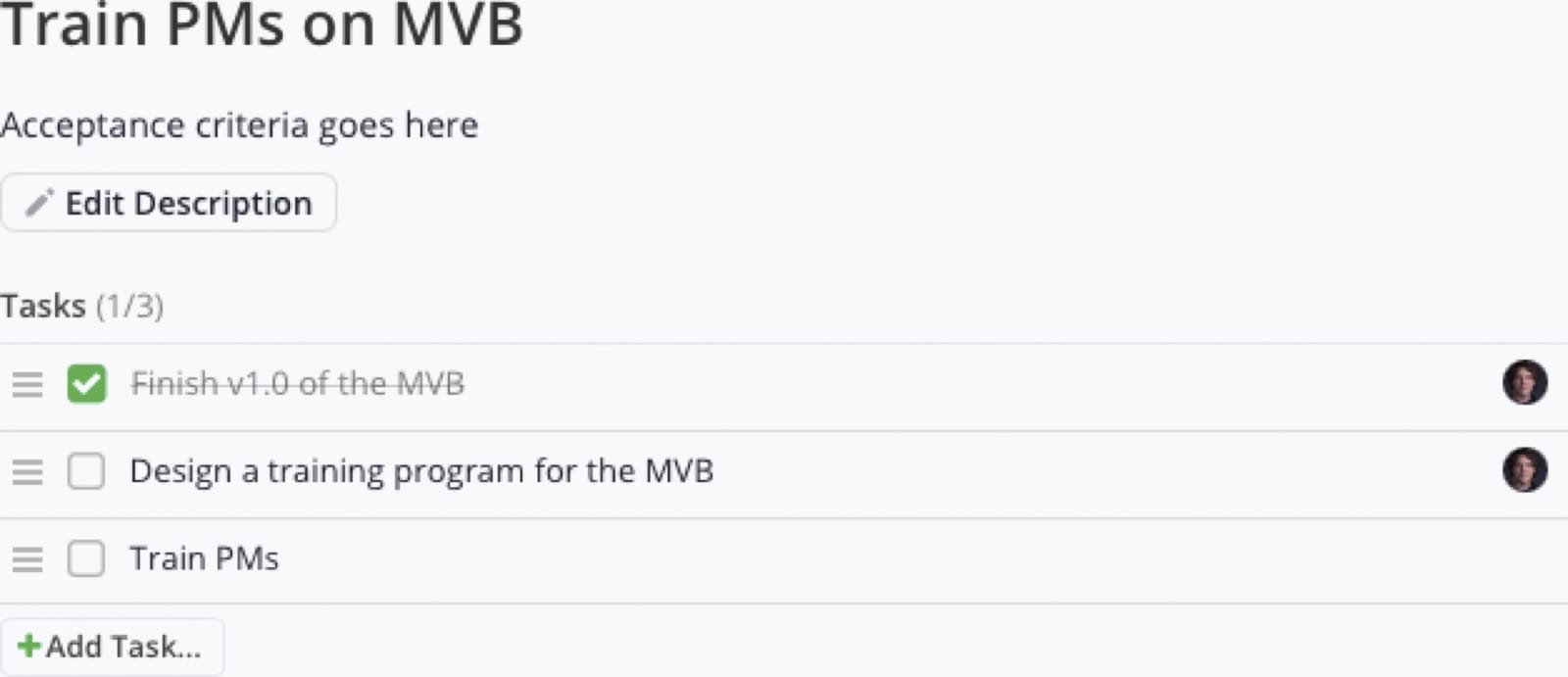
Checklist Items are written by and for the team. Builders write Checklist Items, not Product Managers. Builders self-assign Checklist Items right before working on them; they are not pre-assigned. Most Checklist Items are written at Team Iteration Planning or during the Iteration.
We encourage teams to create a Story Template in Shortcut covering their team’s DoD items. If you haven’t done this yet, it’s a quick win, ask your coach for help.
Definition of Ready (DoR)
Quick test: the team reviews stories together at refinement, typically driven by the PM. If any Builder has questions or there is an unresolved dependency on another team, it’s not Ready. Stories almost never pass through refinement without questions and resulting clarifications. If you’re not updating most stories at most refinements, something may be off with your process.
Refinement is where stakeholder ambiguity becomes buildable structure. That resolution is substantive work, led by the PM with the Builders; budget for it explicitly (a useful default is 5–10% of team capacity) rather than treating it as free.
A Story is Ready when it passes INVEST plus the additional gates:
INVEST:
- Independent: no unresolved in-Iteration dependency on another Story. Use “Story Relationships” in Shortcut to make dependencies visible.
- Negotiable: scope can change until the Iteration starts. After that, the Acceptance Criteria should not materially change without the team’s consent. When in doubt, create a new Story.
- Valuable: clear, articulated value to stakeholders. If you can’t state the value, don’t do the work.
- Estimated: Story Points via Planning Poker or Affinity Estimating. If the team can’t estimate the Story, consider a Spike.
- Small: ideally ≤¼ of the team’s Plannable Velocity, must be <½.
- Testable: acceptance criteria specific enough to write tests against. We expect Gherkin (Given/When/Then) for Features; suggested for Chores when applicable.
Additional gates:
- Existing technical debt that needs consideration is identified and documented as part of the requirements.
- Existing functionality on our cloud platform investigated, to prevent re-inventing the wheel.
- Potential change/addition of 3rd-party infrastructure costs evaluated.
- Bug Priority selected if a Bug (P0, P2, or P3).
- Architecture diagrams and wiki pages checked: consult them if they exist; extend the estimate to create them if they don’t.
- UX work complete where the team’s scope of skills demands it (research, wireframes, mocks, written content, visual design).
- Story-specific NFRs identified beyond the Global DoD (scalability, reliability, etc.).
- If the Story involves shared configuration changes (product configuration, schema, workflow rules, pricing rules, or any other shared configuration domain): verify whether the change requires updates in the internal-tools ecosystem; notify the internal-tools team before development begins (preferably with a PR including high-coverage unit tests for their review); identify downstream systems relying on the configuration (customer-facing flows, admin flows, ETL pipelines, reporting layers, validation logic); update the relevant diagrams, documentation, and integration contracts; and ensure test cases reflect the change across dependent systems.
Resolve as many unknowns as possible before work starts. High utilisation leaves little room for back-and-forth mid-Iteration. Use Kick-Off, Joint Backlog Refinement, VS Planning, and Team Planning to do your discovery, not the days after In Process. Some unknowns only surface once you start building: that’s expected. The goal is not to discover mid-Iteration what you could have discovered earlier.
Definition of Done (DoD): Stories
Quick test: could this go to production right now without anyone worrying? If not, it’s not Done.
We have two Global DoDs: one for Stories, one for Releases. Teams and Value Streams inherit these Global DoDs as their minimum baseline and add their own criteria. If a Global DoD item genuinely does not apply to your team, you do not need to inherit it, but make this decision thoughtfully, as it is a quality factor for us.
A Story meets the Definition of Done, and may move to Waiting for UAT, when:
Development:
- Code complete, builds successfully
- Dead code removed, comments cleaned, formatting consistent in touched files
- Release value ready to set (the value itself is set at the Accepted transition, not here)
- Feature flags implemented where appropriate for safe rollout, rollback, or progressive delivery; advanced rollout techniques (throttling, soft launch) considered for high-impact changes and discussed with the PM
Testing:
- Unit tests written or updated, verified to ≥80% coverage on new logic
- Integration/API tests where applicable
- Smoke and regression testing in lower environments
- Evidence of testing approach and any accepted risks
- Ready for UAT by peers or stakeholders (UAT itself happens at the Accepted transition)
- Performance/accessibility testing per Story scope
- Monitoring/observability hooks validated if any services are impacted
- Technical documentation updated or created
Security & Compliance:
- 3rd-party libraries, integrations, and external dependencies reviewed for security/compliance before inclusion
- Security scans run and results addressed (for repositories with scanning in their pipelines)
Collaboration:
- PR peer-reviewed, all feedback addressed
- Rollback plan discussed and documented for non-trivial changes
- Acceptance Criteria confirmed met by the development team
- Story-specific NFRs acknowledged and addressed
- Cloud/Infra team consulted if hosting or networking architecture is impacted
Documentation:
- Sufficient docs for internal understanding and support
- Test scenarios, environment assumptions, and service impact noted in the Shortcut ticket
- Architecture diagrams and wiki pages updated
- Significant or long-lived features documented in the wiki (Shortcut tickets are temporary artefacts and may be purged)
If a DoD item cannot be met, add a comment in Shortcut explaining why. This Definition of Done is the gate into Waiting for UAT. UAT sign-off and setting the Release value are the separate gate into Accepted (see the state table above), which is why they are not completion items here.
Definition of Done (DoD): Releases
A release is shippable when:
- All stories meet the Story DoD and are Accepted
- Final integration testing complete across the systems involved
- System-level regression testing complete in staging
- No open P0 Incidents
- All P2 Bugs assessed: resolved or explicitly accepted by the business stakeholder
- Performance/load testing complete for scale-impacting features
- Monitoring and alerting configured and tested
- Rollback plan documented for risky changes
- Data migrations prepared, tested, and reversible
- Internal docs updated, release notes drafted (customer-facing content when needed)
- Release changes logged in Shortcut and/or the wiki
- VSO/PM sign-off where applicable
- Staging validation complete
- RC branch (e.g., rc/yyyy-mm-dd.0) built, link added to the Release Management ticket
If a Release cannot meet all of these requirements, add a comment on the release Story in Shortcut explaining why.
Story Quality
Your team must review the Quality Report at your daily huddle.A worked demonstration of the Quality Report is available upon request; see “Adopting This Handbook.” It checks every Story against our quality rules and tells you what’s wrong and how to fix it. It is the primary tool for catching process drift before it compounds. Automation will increasingly enforce these rules: flagging missing fields, notifying the team, and moving non-compliant work back to the appropriate state if unresolved.
13 A worked demonstration of the Quality Report is available upon request; see “Adopting This Handbook.”
Fix issues by severity:
Severity | Action |
|---|---|
Critical | Fix immediately: these block workflow or break reporting |
Warning | Address within the Iteration: quality is drifting |
Notice | Good practice: consider acting on these |
Examples at each level: Critical: Story In Process without an estimate; In Process or Waiting for UAT but not assigned to the current Iteration; Unplanned (other than a P0 Bug) without a decision-rationale comment. Warning: Feature or Bug Accepted without a PR link; Bug missing steps to reproduce; Story In Process more than 5 business days. Notice: Done with an incomplete checklist; in-progress Feature without Gherkin; Bug or Chore In Process for days with no Checklist Items.
The report also flags team-level health issues (WIP, Unplanned %, estimation gaps, retro action completion). Discuss these at the team and Value Stream level.
Common Mistakes the Quality Report Catches
These are additional rules not obvious from the workflow states above:
- PR/MR link on a Backlog/Ready Story: If you’ve opened a PR, the Story must be In Process. Move it, add it to the current Iteration, and apply a planning label. If you later move a Story back to Backlog or Ready after adding a PR, comment explaining why.
- Sub-tasks on a non-Backlog Story: Sub-tasks are only for Backlog Stories. Remove the Sub-tasks or move the Story back to Backlog before progressing.
- Huge Story (8+ points) past Backlog: too large to complete reliably in one Iteration. Break it down before moving to Ready.
- Bug Priority on a Feature or Chore: Bug Priority (P0/P2/P3) is only for Bug-type stories. Remove it from Features and Chores.
- Due date in the current Iteration but Story not scheduled: if a Story has a deadline falling within the current Iteration, it must be in that Iteration. Schedule it immediately.
- Bug using Feature format: Bugs don’t need “As a ___, I want…” format. Use the Bug template (issue, steps to reproduce, expected/actual result).
- P0 Bug without an AAR link and P0 Bug without follow-up stories: see “Incident Management and After-Action Reviews” above.
Judgement-Based Story Quality
The following guidance covers subtler issues that are harder to catch with deterministic rules. Rely on your team’s Definition of Ready and coaching to catch these.
Specify a specific end-user whenever possible:
- Do not create Stories with titles or descriptions to the effect of “As a user.” Who is the end-user? A customer service representative? A sales agent? A call-centre supervisor?
- Be very wary of stories that read “As a PO,” “As a Builder,” or “As a BA”: these are unlikely to be well-formed user stories. See Liz Keogh’s “Feature Injection and handling technical stories.” Focus on the problem to solve and end-user value.
Keep Stories small and focused:
- Stories should rarely include how-to or solutions; they focus on the who, what, and why. Stories should be potentially releasable on their own.
- Don’t make stories too big or complex: aim for a week or less of work. If your stories regularly take more than a week, pause and diagnose; a coach can help.
- If you find yourself adding many ANDs or ORs to your Acceptance Criteria, that usually means you should create a different Story. The same goes for multiple Gherkin features in one Story. Consider segmenting the use cases. Test your stories on other VSOs and PMs; it’s a fun game to see if you can make the Story smaller.
- A story-splitting cheat sheet helps considerably. You can feed it to an LLM along with your stories for help.
Build on prior Stories:
- The first time you write a scenario, include all the prerequisites necessary to produce your WHEN. But if you are building on a prior Story, link to it and start from there. Example: if your story relates to a “Submit” button on a purchase modal, and the criteria that produce that modal are covered in another story, your GIVEN can start from “Given I am viewing the purchase modal.” Too much repeated detail can steer a Builder (or an agent) in the wrong direction.
And don’t forget non-functional requirements: it is always worth asking whether there are Story-specific NFRs (scalability, reliability, etc.) beyond the Global DoD.
Stories, Standards, and AI
AI agents are not assistants. They are delivery participants. They write code, run tests, open PRs, and enforce standards. The Builder’s role is shifting from writing code to directing agents and reviewing their output. The better your stories, standards, and scope constraints, the better agents perform. This section defines how that works.
Agents are not uniformly capable. They’re brilliant on some tasks and actively harmful on others, with no visible boundary between the two. Routine CRUD, test scaffolding, and well-specified features tend to work well. Complex integrations, security-sensitive logic, and legacy systems with implicit conventions tend to fail. When in doubt, work interleaved with the agent rather than delegating fully. Your team should be actively discovering where that boundary lies.
A Story is a change to the product’s specification: the what and why, expressed as Gherkin or plain-English acceptance criteria, ideally through the lens of a specific end-user persona. It describes the product behaviour to add, change, or fix. It should not contain development how-to.
Engineering standards (the how) belong in encoded team standards, not in individual stories. Testing conventions, architecture patterns, error handling, naming, security checks, DoD compliance: codify these once in shared, versioned artefacts that agents consume automatically. As Fowler puts it, “a team standard encoded as an AI instruction does not depend on someone remembering to apply it. The instruction is the application.” (See Encoding Team Standards.)
This handbook is the first encoded team standard. It moves product and process judgment from people’s heads into shared infrastructure. Team-level agent-instruction files (CLAUDE.md and equivalents) and agent harness configuration are next. The Story DoD remains here for now and will migrate into agent configuration as it matures. The Release DoD stays here as a governance gate.
Story-specific scope constraints stay in the Story because they’re unique to that piece of work:
- Affected systems and configuration domains, especially downstream impacts
- Dependencies on other stories, teams, or external parties (use Shortcut’s Story Relationships field)
- Constraints: what NOT to touch, regulatory limits, performance thresholds
- Non-obvious context that an agent or new Builder couldn’t infer from the codebase alone
The goal: a Story specifies the product change; the harness encodes how we build; scope constraints bridge the two.
If your stories routinely generate agent output that needs heavy rework, check which layer is missing context: the Story, the standards, or the constraints. Agents don’t push back on unclear specs. When they encounter ambiguous acceptance criteria, they fill the gap with plausible-looking but arbitrary implementations rather than asking for clarification. If agent output keeps surprising you, the most likely cause is ambiguity the agent papered over silently.
Team-level technical standards are being built out. Until your team has them, you may need more development context in stories than this model suggests. That’s fine. Encode what you can, improve incrementally.
Working with AI-generated code:
- If you can’t explain why the code is structured as it is, don’t merge it. Confirm you understand the reasoning, not just that CI passes. You are accountable for what ships, whether you or an agent wrote it.
- If an AI PR modifies or deletes tests, that requires explicit rationale in the PR description. No silent test removal.
- The better agents get at routine tasks, the more vigilance is required on edge cases. Humans stop checking when quality is consistently high, which is exactly when novel failures slip through.
- Do not allow AI-written code to accumulate faster than humans can review it. The gap between generation speed and developer understanding is comprehension debt. Unlike technical debt, it’s invisible to automated metrics: a codebase can pass all quality checks while no one understands why it’s structured the way it is. If your team generates PRs faster than it can comprehend them, bring it to your retrospective.
- If encoded standards produce bad agent output, flag it. This is a feedback loop, not a complaint. The standards improve when you report where they break.
- AI use is expected and should be disclosed, not hidden. If you used an agent to write code, say so. This helps the team calibrate review effort and lets us ask the questions that matter: are AI-assisted stories faster? Do they pass UAT at the same rate? Is the review queue backing up? We already track cycle time, backflow, and UAT completeness; answering those questions also takes reporting that joins them to AI use, which the Delivery Intelligence report does not do. AI usage data is for systemic learning, not individual performance evaluation. If disclosure creates extra scrutiny on your work, that’s a process failure worth flagging.
Data protection is a hard gate: do not send production data to external models without explicit authorisation, and route all agent activity through approved tooling only. We also record AI usage per Story (an “AI Usage” custom field: No AI / AI-assisted / AI-primary) so that cycle time, backflow, and UAT quality can be compared by AI usage level once reporting is built to join them. This field is never joined to individual performance data: AI Orchestration capability (Part 4) is assessed on the work a Builder demonstrates, never on per-story usage telemetry.
AI use and just culture:
We apply the same just culture principles to AI use as to any other engineering work. The line between categories is a judgment call, not an objective fact. When “at-risk” patterns emerge, check the system first: if reduced review is locally rational (agent output has been consistently good, the review queue is long), the first conversation belongs at the retro, not in a 1:1.
Category | Example | Response |
|---|---|---|
Normal mistake | Agent generates a subtle bug that passes tests. You reviewed it honestly; it looked fine. | No blame. Fix it, learn from it. |
At-risk | Repeatedly rubber-stamping agent PRs without reading them because they’ve been consistently good. | Coaching conversation. |
Reckless | Sending production data to an unauthorised external model. Using AI to bypass security controls. | Disciplinary. |
Systemic drift | Multiple Builders independently rubber-stamping because agent quality has been consistently high. | Not a coaching issue. This is a constraint conversation: review capacity, WIP policy, or tooling. Bring to the retrospective. |
Heavy AI reliance degrades fundamental coding skills through disuse. Counteract this deliberately: write tests before generating code, pair on complex work, and periodically build without agent assistance.
Systematically move common error patterns from human review to automated verification. Automated checks (linting, CI/CD gates, convention enforcement) scale with agent output for free; human review scales linearly and gets more expensive. This is the primary lever for relieving the review constraint.
Quick Reference: Agent Checklist
For AI agents administering Shortcut stories, verify before any state transition:
Moving to Ready:
- Estimate present and <8 points (≥8 = Huge, must stay in Backlog until broken down)
- At least one categorisation label present
- Bug Priority set if Bug type (P0, P2, or P3, never P1 or P4)
- Bug Priority NOT set if Feature or Chore type
- Acceptance Criteria or Steps to Reproduce present
- No Sub-tasks (Sub-tasks are for Backlog only)
Moving to In Process:
- Assigned to the current Iteration
- ✅ Planned or ⚠️ Unplanned label applied
- If ⚠️ Unplanned (except P0 Bugs, whose incident record carries the rationale): decision-rationale comment added
- Team WIP limit not exceeded
- If the Story has a Due Date in the current Iteration, it’s scheduled for this Iteration
Moving to Accepted:
- Release custom field set (value or NA, not None)
- At least one categorisation label present
- All Checklist Items complete or removed
- If Feature or Bug: PR/MR link present (if resolved without a code change, add a comment explaining how)
After P0 Resolution:
- AAR document linked (shared AAR folder) within 5 business days
- Follow-up action Stories created, estimated, and linked via “Relates to” within 5 business days
General:
- Never use P1 or P4 for new bugs
- Never set Due Dates without CTO/CMO approval
- Never create Epics, Iterations, Teams, Custom Fields, or Workflows
- Story type (Feature/Bug/Chore) matches the nature of the work
- If a PR/MR exists, the Story must be In Process, in the current Iteration, with a planning label (not Backlog/Ready)
- Bugs use the Bug template format, not “As a… I want…” Feature format
- Every Story In Process or Waiting for UAT has a progress comment within the last business day
Shortcut: Do Not Touch
Do not change any of the following without talking to the Shortcut administrator first. These feed reporting and automation. Unexpected changes will be reverted, and we often can’t tell who made them. Contact us first so we can help you find a workable solution:
- Iterations
- Teams
- Custom Fields
- Epic Automations
- Workflows (do not create new ones)
- Epics (do not create without approval; they may be archived)
Administration Notes
Iterations are global across the department and pre-defined. Please do not change these. The Iteration name is the year and week number of the first day of the Iteration.
There must be an exact one-to-one mapping between Teams in Shortcut and Teams in our canonical Teams sheet, for a variety of reasons including tax-credit reporting. Please do not create “sub teams,” separate Backlogs, or the like, and do not create teams for groups outside our product R&D organisation within the product workspace; they will interfere with our reporting. We generate reports for finance each month, and name mismatches cause manual work.
Do not create or edit Custom Fields. Each additional Custom Field increases the cognitive load for every team. Most things we’re inclined to do with Custom Fields can be accomplished in other ways, such as with Labels.
Please leave Auto Start Epic on and Auto Complete Epic off (under Settings → Automation → Epics).
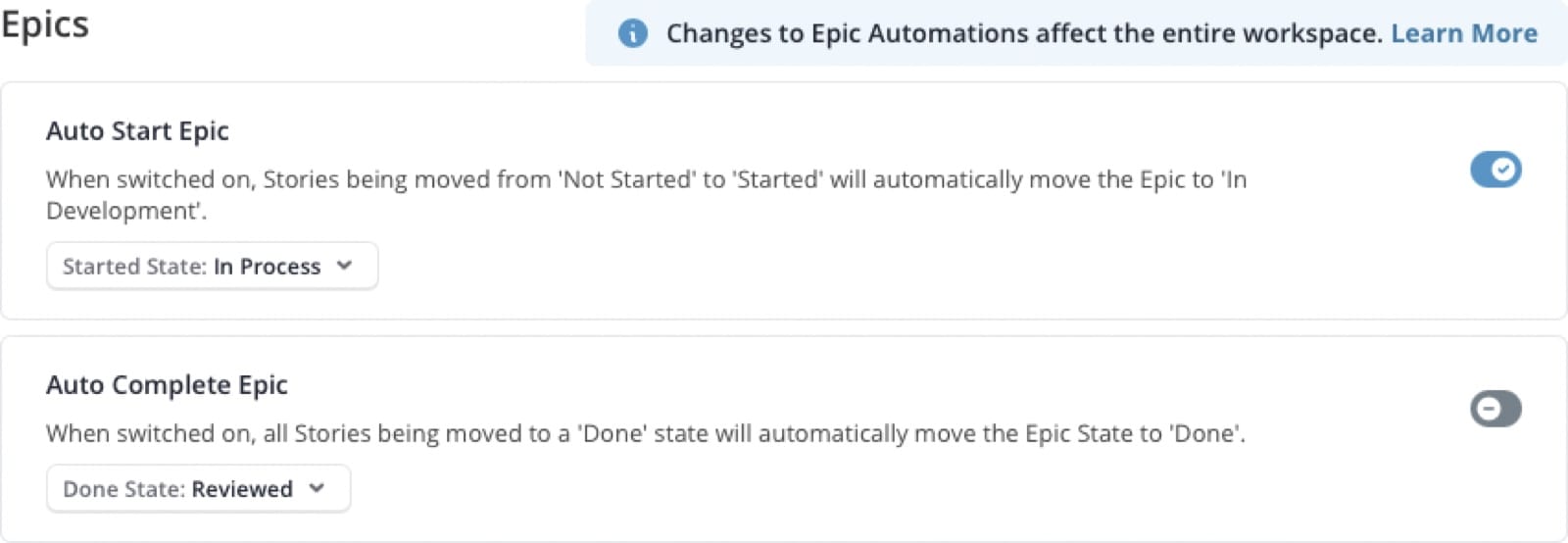
These are global settings that affect every team. We auto-start Epics to save time and keep Epic information current. However, completing all the Stories for an Epic means it is Delivered, not Reviewed. The Epic must be adopted by our customers, and we conduct an Epic Investment Review before calling it Reviewed.
Our audits require most software development teams to use the standard “Product Development” Shortcut workflow (the states described in “Story Workflow States” above). If you believe your team should be exempt, reach out to the Shortcut administrator; workflows created without prior authorisation are subject to deletion without notice.
Release Notes
Our release notes should do more than document changes; they should excite and inform. Think of them as a type of marketing communication:
- User-centric focus: Tailor the release notes to the end-user’s needs and questions.
- Start with the why: Clearly articulate why we made the release. What problems does it solve? What benefits will users experience?
- Make changes visible: Show, don’t just describe. Use screenshots, GIFs, or videos whenever possible.
- Impact: Explain how the changes affect users, note any workflow alterations, and specify any actions users need to take.
- Clarity and conciseness: Keep the language direct and focused, with links to deeper resources (e.g., a wiki page) for those who want the detail.
Deliver release notes directly within the application where possible (e.g., an in-app announcement), complemented by succinct messages in other channels (chat, email) that follow the same principles.
Who to Ask
Asking for help is how we work. First move: ask the Builder next to you. If they can’t help, use this table.
Question | Contact |
|---|---|
Shortcut admin (Iterations, Teams, Custom Fields, Workflows, Epics) | The Shortcut administrator (Enterprise Performance Coach) |
Story quality, process, retrospectives, AARs | Enterprise Performance Coach |
Prioritisation conflicts between stakeholders | CMO / CTO |
Due Date approval | CTO or CMO |
Expedited work | CTO or CMO |
Incident management runbooks, P0 process | Incident-management owner |
Backlog priorities (your Value Stream) | Your Value Stream Owner |
Story requirements, acceptance criteria, backlog health | Your PM (drives refinement, supports UAT; anyone can write stories) |
Technical coaching, pairing, career growth | Your Engineering Coach |
Retro facilitation help | Enterprise Performance Coach |