
The tweets displayed on the right-hand column of my blog are displayed with an excellent little utility called HL Twtter.
I found a little bug: HL Twitter doesn’t seem to unescape HTML entities when displaying tweets.
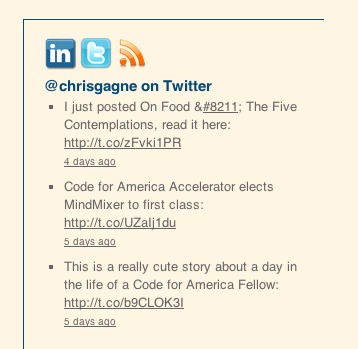
I made a minor edit to the plugin’s functions.php file that appears to have resolved the issue. Add the four highlighted lines below to the hl_twitter_show_tweet() function to clean up the tweets a little before displaying them (additional lines provided for context):
/*
	Returns a tweet with all links, hashtags and usernames converted to links
*/
function hl_twitter_show_tweet($tweet) {
	$tweet = preg_replace("/&/", "&", $tweet);
    $tweet = preg_replace('/&#(\d+);/me',"mb_convert_encoding('&#' . intval(\\1) . ';', 'UTF-8', 'HTML-ENTITIES');",$tweet); #decimal notation
    $tweet = preg_replace('/&#x([a-f0-9]+);/mei',"mb_convert_encoding('&#' . intval(0x\\1) . ';', 'UTF-8', 'HTML-ENTITIES');",$tweet);  #hex notation
    $tweet = html_entity_decode($tweet);
	$tweet = preg_replace("#(^|[\n ])([\w]+?://[\w]+[^ \"\n\r\t< ]*)#", "\\1<a href=\"\\2\">\\2</a>", $tweet);
	$tweet = preg_replace("#(^|[\n ])((www|ftp)\.[^ \"\t\n\r< ]*)#", "\\1<a href=\"http://\\2\">\\2</a>", $tweet);
	$tweet = preg_replace("/@(\w+)/", "<a href=\"http://twitter.com/\\1\">@\\1</a>", $tweet);
	$tweet = preg_replace("/#(\w+)/", "<a href=\"http://search.twitter.com/search?q=\\1\">#\\1</a>", $tweet);
	return $tweet;
} // end func: hl_twitter_show_tweet
I didn’t use chr() on lines 262 and 263 because it doesn’t support Unicode characters (such as the em-dash I was looking for).
As always, comments and suggestions are most welcome. It wouldn’t surprise me if there were some edge cases I didn’t catch.
Update 7/18: Got in touch with the developer, Luke. At some point, PHP is supposedly phasing out support for executing code in preg_replace but he’ll implement a different fix. Thanks! 🙂
It’s not working for me… I have hashtags with Unicode characters that don’t seem to be recognised by (\w+) in line 268
Try “#poesía?” or “#Informática”
David
Hi David,
I think you found another edge case! 🙂 From what I’ve seen online it appears that PHP’s behavior for matching \w may be locale/server/character-encoding specific. Rather than dig too far into that can of worms, I found it easier to just let the preg_replace act a bit more permissively.
Replace “(\w+)” on line 268 with “([\p{L}_\d]+)”. Adjust that last one as you see fit. This isn’t perfect as hash tags don’t appear to “legally” start with numbers, but numbers seem perfectly reasonable to search for and it does work. Have fun!
The link below your HL twitter sidebar widget, “View more tweets” does not work. It also does not work for me on my site. How can we get this working?
Hi James, try this: 1. Change your permalink settings, click Save, then change them back and click Save again. Then, deactivate and reactivate the HL Twitter plugin. That just did the trick for me.
Thank you Chris, that was very helpful.